
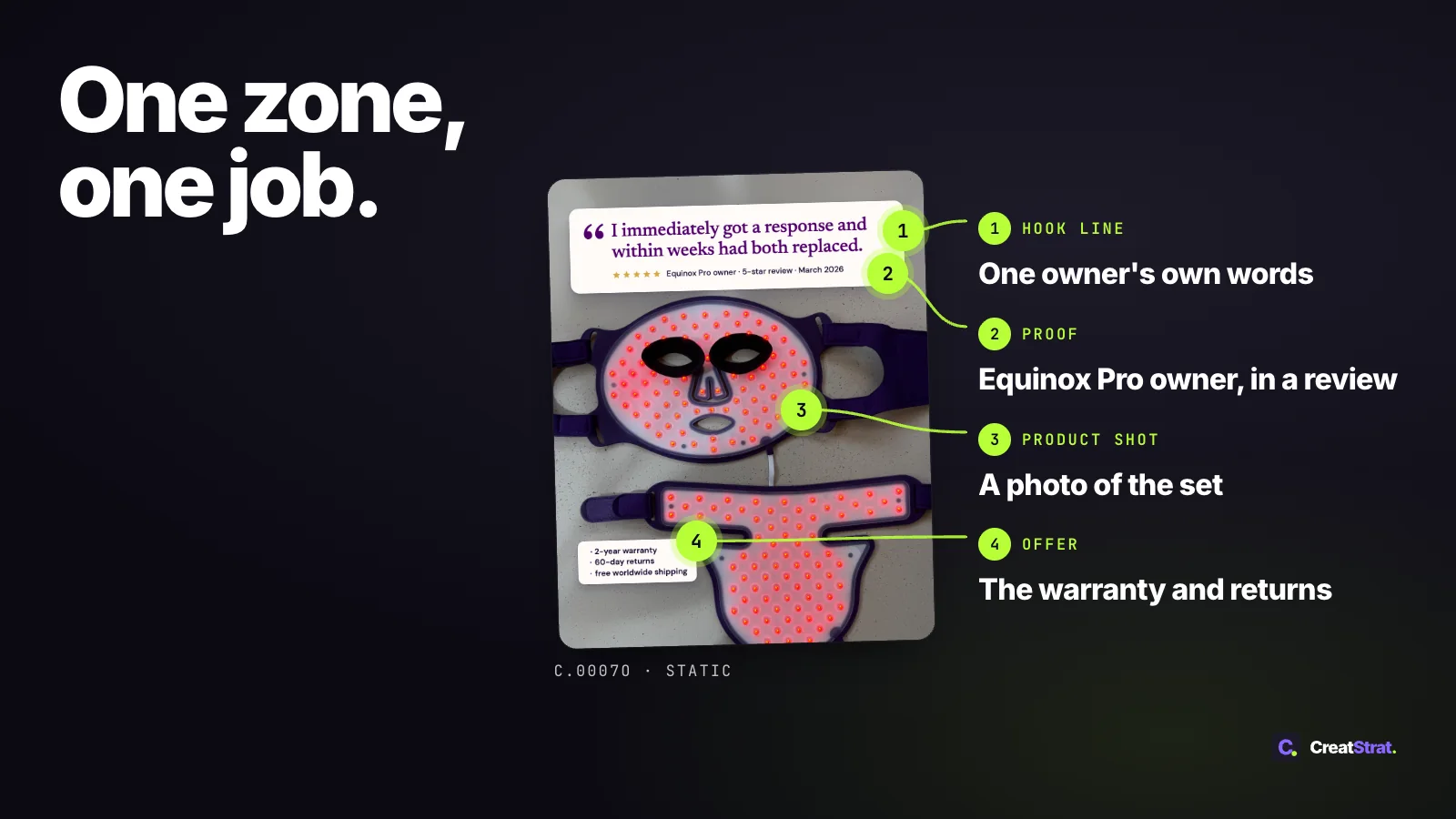
A static image ad on Meta crowds easily. The hook wants the top of the frame, the product wants the middle, and a review line, an offer and a logo all ask for whatever space is left. The Meta pages we checked are specific about image size and text and don't list the rest, such as which corner a logo goes in. This post gives each zone one job and puts Meta's wording beside it with the date we checked.
You get a six-row zone map, a size table by feed, and a straight answer on whether Meta still limits text on the image.
What is a static ad on Meta?
A static image ad on Meta is one still image (JPG or PNG) with three copy fields outside it: primary text, a headline and a call-to-action button. In CreatStrat's framing, each zone of the image has one job: stop the scroll, show the product, prove the claim, give a reason to act, or name the brand.
That definition is CreatStrat's. The file types and field names come from the Meta Ads Guide pages "Awareness Image Ad Specs on Facebook Feed" and "Awareness Image Ad Specs on Instagram Feed" (accessed November 2, 2026), which call the format image ads.
Meta for Business calls it photo ads ("Photo Ads: Create Advertising with Inspiring Pictures & Imagery", accessed November 2, 2026), and this post calls it a static ad.
Before you lay anything out, pick the one claim the image carries. Meta for Business's "Photo Ads: Create Advertising with Inspiring Pictures & Imagery" page (accessed November 2, 2026) says it under the subhead "Have a single focal point.": "Ensure that you're only asking people to look at one thing."
The one-glance test is CreatStrat's framing, not Meta's: at phone size, say what the image claims in one sentence. If it takes two, move one claim into the primary text or a second ad.
What does each zone of a static ad do?
The map sets each zone against five Meta pages, all accessed November 2, 2026: the Meta Ads Guide's "Awareness Image Ad Specs on Facebook Feed" [1] and "Awareness Image Ad Specs on Instagram Feed" [2], Meta for Business's "Photo Ads: Create Advertising with Inspiring Pictures & Imagery" [4], and the Meta Business Help Center's "Best practices for image ads" [5] and "About text overlays and the safe zone for ads on Facebook and Instagram" [6]. The Meta column holds only Meta's words, and "the pages checked" means these five. Every other column is CreatStrat judgement, not a tested result.
One zone, one job: each part of a static either stops the scroll, shows the product, proves the claim, gives a reason to act now, or says whose ad it is. That's CreatStrat's framing, not a Meta rule.
| Zone | Its one job (judgement) | What goes there (judgement) | What Meta's pages say | Common miss (judgement) |
|---|---|---|---|---|
| Hook line | Stop the scroll and say who the ad is for or what problem it solves. | Upper third, inset from the sides: a few words in large type, taken from your customers' own words (where the hook line comes from). | Help Center [5]: "Use a modern, clean font in a large enough type size and a contrasting hue." Photo Ads [4]: "stick to the most important details." The pages checked don't list a position for this line. | A sentence where a phrase would do, or type too small to read at phone size. |
| Product shot | Show the thing, ideally in use. | Center of the frame: one subject, the product in use. | Help Center [5]: "Show people using your product or service: This helps people visualize themselves doing so." | Several products or angles crowding one frame. |
| Proof element | Make the hook believable. | Near the product, inside the side margins: a review line, a rating, a count, or a demonstration. | The pages checked don't list a review or rating element. | A proof line that competes with the hook, or proof that isn't the customer's own words (see the guardrail for putting a review into an ad). |
| Offer or reason to act | Give a reason to tap now. | Lower third, above the bottom edge: the offer, a bundle, a return window, or a plain reason such as "ships tomorrow". | The pages checked don't list an offer or price zone. The call-to-action button is a copy field (last row). | Repeating the button's words inside the image. |
| Brand mark | Say whose ad it is. | Logo or wordmark, inset from the sides and off the bottom edge, in the same colors and type across the set. | Help Center [5]: "Show your brand or logo: People engage more with brands they know, or brands which show they are credible." Apart from keeping logos off the edges (see the note under the map), the pages checked don't list where the logo goes or how large it is. | A logo so small it disappears at feed size, or so large it becomes the subject. |
| Copy fields outside the image | Carry what the image leaves out. | Primary text (the argument), headline (the benefit in a few words) and the call-to-action button. Field by field: the copy fields guide. | Facebook Feed [1]: "Primary Text: 50-150 characters", "Headline: 27 characters". Instagram Feed [2]: "Primary Text: 125 characters", "Headline: 40 characters". Neither Ads Guide page lists a description length. | The headline repeating the image's hook word for word. |
The free ad is one of these: a finished static built from your product page, with its brief and Meta copy.
Free. One finished static ad with its brief and Meta copy, emailed within 24 hours. One per brand.
According to Meta's Business Help Center ("About text overlays and the safe zone for ads on Facebook and Instagram", accessed November 2, 2026), Instagram Feed ads in 1:1 or 4:5 should "keep the bottom and side edges free of key creative elements, text and logos."
That sentence names Instagram Feed and lists the bottom and sides, not the top. It gives no percentage for a feed image, so this post prints none. Keeping the offer, the proof and the logo inside those edges is CreatStrat's judgement.
Instagram Feed: keep key elements, text and logos off these edges (Meta Help Center)
Outside the image: primary text, headline, call-to-action button
Two eye-tracking studies in the Journal of Marketing add context from outside Meta. Pieters and Wedel (2004), in an eye-tracking analysis of 1,363 print ads, not Meta feed ads, report that the pictorial is superior in capturing attention, independent of its size, and that the brand element most effectively transfers attention to the other elements. Pieters, Wedel and Batra (2010), in an eye-tracking study of 249 ads, not Meta feed ads, report that feature complexity hurts attention to the brand and attitude toward the ad, while design complexity helps attention to both the pictorial and the advertisement as a whole.
A comparison static rearranges these zones, and its layout has its own post: how to build an us vs them ad.
What size should a static ad be on Facebook and Instagram?
According to Meta's Ads Guide ("Awareness Image Ad Specs on Facebook Feed" and "Awareness Image Ad Specs on Instagram Feed", accessed November 2, 2026), the recommended image on both Facebook Feed and Instagram Feed is 4:5 at 1440 x 1800 pixels.
Meta's Business Help Center page "Best practices for image ads" (accessed November 2, 2026) says: "You might use either a 1:1 or 4:5 ratio for Facebook Feed, and a 9:16 ratio for Instagram Stories. Vertical 4:5 is recommended for single-image ads to be delivered to the ad placements Facebook Feed."
The two feeds agree on the recommended image and differ on the text: Meta's Ads Guide lists 50-150 characters of primary text and a 27-character headline on Facebook Feed, and 125 and 40 on Instagram Feed ("Awareness Image Ad Specs on Facebook Feed" and "Awareness Image Ad Specs on Instagram Feed", accessed November 2, 2026).
| Spec | Facebook Feed [1] | Instagram Feed [2] |
|---|---|---|
| Ratio | 4:5 | 4:5 |
| Resolution | 1440 x 1800 pixels | 1440 x 1800 pixels |
| File type | JPG or PNG | JPG or PNG |
| Maximum file size | 30MB | 30MB |
| Minimum width | 600 pixels | 500 pixels |
| Aspect ratio tolerance | 3% | 1% |
| Ratio limits | Not listed | "Minimum Aspect Ratio: 400 x 500", "Maximum Aspect Ratio: 191 x 100" |
| Primary text | 50-150 characters | 125 characters |
| Headline | 27 characters | 40 characters |
| Description | Not listed | Not listed |
For Instagram Stories, Meta's Ads Guide page "Awareness Image Ad Specs on Instagram Stories" (accessed November 2, 2026) lists 9:16 at 1440 x 2560 pixels, with its own safe-zone margins on the same page; the Instagram Reels ad safe zone post covers those margins.
Some spec roundups we've seen give a different Facebook Feed image size and primary-text length; the figures here come from Meta's Ads Guide pages (accessed November 2, 2026). Those page titles name the Awareness objective, and we didn't check other objective tabs.
Does Meta still limit text on ad images?
Meta's Business Help Center ("Best practices for image ads", accessed November 2, 2026) says: "There is no longer a limit on the amount of text that can exist in your ad image. The text overlay tool is no longer available."
That page is undated, so the date comes from trade press. Search Engine Journal reported on September 23, 2020 that Facebook had removed its 20% text limit on ad images (Susan Wenograd, "Facebook Removes the 20% Text Limit on Ad Images").
The other side of the same question comes from Meta for Business's "Photo Ads: Create Advertising with Inspiring Pictures & Imagery" page (accessed November 2, 2026), which says under the subhead "Remember less text is more.": "Too much copy is distracting and can lead to your ad being shown to fewer people."
One study speaks to text size. Pieters and Wedel, in a 2004 Journal of Marketing eye-tracking analysis of 1,363 print ads, not Meta feed ads, report that the text element best captures attention in direct proportion to its surface size, and that only increments in the text element's surface size produce a net gain in attention to the advertisement as a whole.
CreatStrat's reading, which is judgement: few words, set large, kept off the product. The pages checked don't list a word count, so this post prints none.
Which jobs suit a static, and which suit a video?
According to Meta for Business ("Photo Ads: Create Advertising with Inspiring Pictures & Imagery", accessed November 2, 2026), "If you're trying to include too many things in one image, consider using carousel ads or video ads."
Meta's Ads Guide page for image ads, "Awareness Image Ad Specs on Facebook Feed" (accessed November 2, 2026), carries this guidance sentence: "To capture attention quickly, use movement and sound to show the unique features of a product or tell your brand story."
In CreatStrat's judgement, a static's job is one claim read in one glance. A sequence, like the three steps of a routine, belongs in a card-by-card carousel structure or a video. We found no sourced comparison of static and video results on Meta feeds, so this post doesn't pick a winner.
How many versions of one static should you test?
Change one zone per version and keep the rest. In CreatStrat's judgement, the zone to change is the hook line or the proof element, while the product shot and the brand mark stay fixed. Then the one change is the first place to look when two versions differ. We found no sourced number for versions of one static, so this post gives none.
For the half you keep, Meta for Business's "Photo Ads: Create Advertising with Inspiring Pictures & Imagery" page (accessed November 2, 2026), under the subhead "Maintain visual consistency.", says to "be sure all your images have a consistent theme and tie together visually." and that "People will more easily recognize your ad and stop to see what else you have to say."
Five versions of one layout are still one idea. For different ideas, not different formats, start a new concept. Weekly volume is in how many new ads per week, and reading results is in which part of the ad each metric blames.
How CreatStrat handles static ads
CreatStrat is a software subscription that delivers finished ads every week; CreatStrat researches, plans the tests, writes the brief, and produces the finished statics, carousels, mashups, AI video, and AI UGC, each with its Meta copy; your creative strategist is built in.
Statics are the plan's base unit: "5 finished image ads + 5 briefs delivered every week" at $299 a month, total billed monthly. The $499 and $899 plans bring 10 and 20 ads a week. Each plan is one combined monthly price, billed monthly, and you can cancel anytime. Choose your ad mix.
Every finished static arrives with its brief and complete Meta copy: primary text, headline, description and call-to-action. The brief carries the hook, the layout and the visual direction. For the production side of a brief, see section 3, "The full script, ad copy, and production direction". For delivery formats, see what sizes and copy a finished ad arrives with. CreatStrat produces the finished ads; you launch them in your own Meta account.
One CreatStrat customer on their first 60 days:
In our first 60 days, we launched 47 CreatStrat concepts. Nine became winning ads and our blended creative CPA dropped 23%.
 Naomi C. · CreatStrat customer
That's one customer's result, not a promise or an average.
Frequently asked questions
What is a static ad on Facebook and Instagram? A static image ad on Meta is one still image (JPG or PNG) with three copy fields outside it: primary text, a headline and a call-to-action button. Meta's Ads Guide ("Awareness Image Ad Specs on Facebook Feed", accessed November 2, 2026) calls the format image ads.
What size should a Facebook static ad be? According to Meta's Ads Guide ("Awareness Image Ad Specs on Facebook Feed" and "Awareness Image Ad Specs on Instagram Feed", accessed November 2, 2026), the recommended image on both feeds is 4:5 at 1440 x 1800 pixels, with minimum widths of 600 pixels (Facebook Feed) and 500 (Instagram Feed).
How much text can a Facebook ad image have? According to Meta's Business Help Center ("Best practices for image ads", accessed November 2, 2026), "There is no longer a limit on the amount of text that can exist in your ad image." CreatStrat's reading: a few words, set large, kept off the product.
Are static ads better than video ads on Meta? We found no sourced comparison of static and video results on Meta feeds, so this post doesn't pick one. Meta for Business ("Photo Ads: Create Advertising with Inspiring Pictures & Imagery", accessed November 2, 2026) suggests carousel or video when one image would hold too many things.
What should a static ad headline say? The benefit in a few words, not the image's hook repeated (CreatStrat's framing). Meta's Ads Guide lists a 27-character headline on "Awareness Image Ad Specs on Facebook Feed" and 40 on "Awareness Image Ad Specs on Instagram Feed" (accessed November 2, 2026). Detail: the copy fields guide.
Do static ads still work on Instagram? We found no sourced study of how static ads perform on Instagram. Meta's Ads Guide lists image specs on "Awareness Image Ad Specs on Instagram Feed" (4:5, 1440 x 1800 pixels) and "Awareness Image Ad Specs on Instagram Stories" (9:16, 1440 x 2560 pixels), accessed November 2, 2026.
Start from your product page
See a finished static for your own product.
Share a product page URL and email. Within 24 hours we'll send a finished static ad for your product, with its brief and Meta copy. One per brand.
Want to see the app first? Book a demo →
Sources
- Meta. "Awareness Image Ad Specs on Facebook Feed". Meta Ads Guide. https://www.facebook.com/business/ads-guide/update/image/facebook-feed. Accessed November 2, 2026.
- Meta. "Awareness Image Ad Specs on Instagram Feed". Meta Ads Guide. https://www.facebook.com/business/ads-guide/update/image/instagram-feed. Accessed November 2, 2026.
- Meta. "Awareness Image Ad Specs on Instagram Stories". Meta Ads Guide. https://www.facebook.com/business/ads-guide/update/image/instagram-story. Accessed November 2, 2026.
- Meta. "Photo Ads: Create Advertising with Inspiring Pictures & Imagery". Meta for Business. https://www.facebook.com/business/ads/photo-ad-format. Undated page, accessed November 2, 2026.
- Meta. "Best practices for image ads". Meta Business Help Center. https://www.facebook.com/business/help/388369961318508. Undated page, accessed November 2, 2026.
- Meta. "About text overlays and the safe zone for ads on Facebook and Instagram". Meta Business Help Center. https://www.facebook.com/business/help/980593475366490. Undated page, accessed November 2, 2026.
- Wenograd, S. "Facebook Removes the 20% Text Limit on Ad Images". Search Engine Journal. September 23, 2020. https://www.searchenginejournal.com/facebook-removes-the-20-text-limit-on-ad-images/381844/
- Pieters, R., & Wedel, M. 2004. Attention capture and transfer in advertising: brand, pictorial, and text-size effects. Journal of Marketing, 68(2), 36-50. doi:10.1509/jmkg.68.2.36.27794.
- Pieters, R., Wedel, M., & Batra, R. 2010. The stopping power of advertising: measures and effects of visual complexity. Journal of Marketing, 74(5), 48-60. doi:10.1509/jmkg.74.5.048.